

Link Whisper Review: What You’re Actually Buying
I spent months and months building this site and its internal links by hand. One tab open, sitemap search, cmd-F, repeat. Somewhere around post 30, I started thinking, “there HAS to be a plugin for this. PLEASE!”
Link Whisper is the name that keeps coming up when you ask that question. It’s been around long enough that half the WordPress SEO blogosphere has already reviewed it (since 2019).
That’s exactly why I wanted real numbers before adding my own opinion to the pile. It’s the same numbers-first approach I took with my web host and my Oura ring before either got a dollar of my money.
Short version: Link Whisper is a genuinely capable AI internal-linking plugin with an established install base. It’s also the priciest of the three serious options – and its own third-party review record is thinner and more mixed than 30,000+ active installs might suggest. Full breakdown below.
One disclosure before you read any further, because it matters here. Everything below is built from:
- Link Whisper’s official pricing and documentation
- Its WordPress.org install and rating data
- Its thin third-party review record
- A head-to-head against its two closest competitors
- Me using it for 24 months
What it actually does
Internal linking is hugely important to boost your website’s SEO. It helps search engines discover your pages and shares ranking power (or “juice” as some people call it) between pages.
Link Whisper reads your post while you write and suggests other posts on your own site worth linking to, matching by meaning rather than exact keyword text.
It also audits your whole site afterward for orphaned pages and broken internal links. Its WordPress.org support forum shows Spencer Haws, the plugin’s creator, used to reply directly to user threads before he sold the business, for what that’s worth on the “is anyone home” question.
Credentials, quickly. I run richardriviere.com, and I maintained this site’s own internal-linking structure by hand for many months. The same slow, manual approach I describe in how I actually got this business started. Then I used Link Whisper for two years., and now LinkBoss That’s the lens this review comes from, not a marketing agency’s or tool vendor’s.
Product Overview: Features, Pricing, Who It’s For
The core feature list, pulled from Link Whisper’s own WordPress.org listing and help docs:
- AI-powered link suggestions live in the block editor, matching by meaning rather than exact keyword match
- Site-wide link-health reports: orphaned pages with no internal links pointing at them, and broken internal links
- Bulk auto-linking and bulk URL replacement
- Google Search Console integration
- An option to supply your own OpenAI API key, so you’re not capped by the plugin’s bundled AI credits
- Support for 20+ languages
- Topical clustering via a one-click setup, on the higher tiers
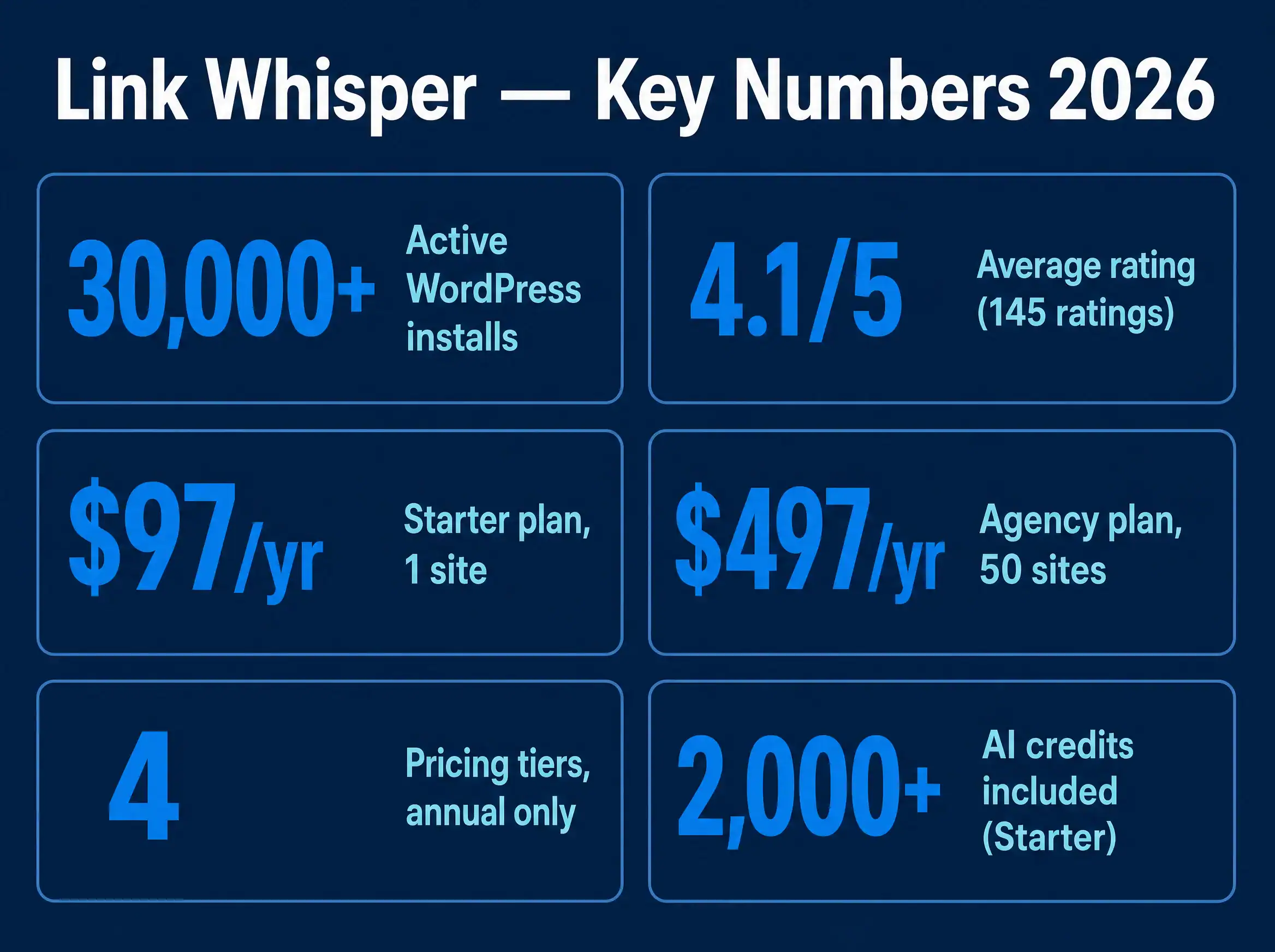
There’s also a genuinely free version if you use WordPress.org to host your site: 30,000+ active installs at last count. But it’s a lite build. Editor suggestions and health reports, yes – bulk auto-linking, broken-link detection, and topical clustering, no. Those need a paid license.
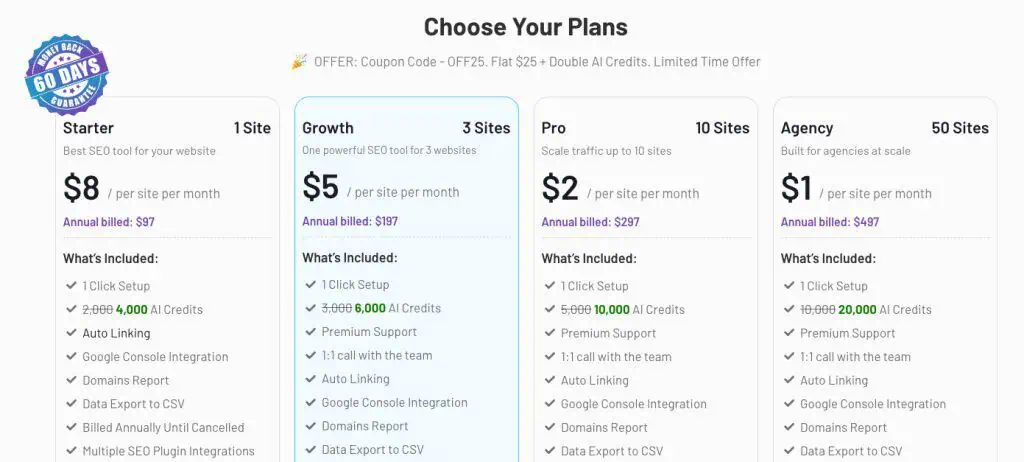
| Tier | Price / year | Sites | AI credits / month |
|---|---|---|---|
| Starter | $97 | 1 | 2,000 |
| Growth | $197 | 3 | 3,000 |
| Pro | $297 | 10 | 5,000 |
| Agency | $497 | 50 | 10,000 |
No free version of the full feature set, and no monthly option. Licenses are annual only, per Link Whisper’s own pricing and plans documentation… which doesn’t help make this feel any less expensive.
AI credits reset monthly. When they run out mid-cycle, Link Whisper falls back to plain keyword matching rather than stopping outright, a sensible design choice that a lot of AI-credit products don’t bother with.
Who it’s built for: solo bloggers running one to three sites, up through small agencies managing a stable of client sites. So that’s you if you’re thinking about starting a coaching business on the side of your day job.
The tier ladder is built entirely around site count, not feature gating; every paid tier gets the same feature set.
Design and the Editor Experience
Suggestions surface in a sidebar panel inside the block editor as you write, and the site-wide link-health reports live in their own page under wp-admin.
Open the dashboard, and suggestions appear: source sentence, anchor text, and target post. And that’s across every article you’ve ever published, not just new ones.
My beef with it is that it can miss the best and most obvious post you should be linking to. And LinkBoss doesn’t just find relevant text in your article – it will write an entire new sentence to incorporate your link so that it doesn’t sound forced. Link Whisper can’t do that.
Performance: What the Data Says
Two independent, publicly verifiable numbers exist for judging Link Whisper’s real-world reception: its WordPress.org rating, based on the free lite plugin, and its Capterra rating, based on the paid product. Both are worth seeing side by side with its nearest plugin competitor, Internal Link Juicer.
WordPress.org ratings, both plugins’ free-tier listings, checked September 2026. LinkBoss isn’t on WordPress.org, it’s a cloud SaaS rather than a plugin, so there’s no equivalent rating to plot here.
Internal Link Juicer isn’t just rated higher. It has 3.7 times the number of ratings, on a plugin with nearly three times Link Whisper’s install count: 90,000+ versus 30,000+. That’s a much bigger sample making a much more confident claim about the free experience specifically.
Link Whisper’s edge on paper is the matching method itself: AI-based semantic matching versus Internal Link Juicer’s keyword-based system. Whether that edge is worth the price and rating gap is the actual question I wanted to answer. There’s more in the comparison below.
Setup, Daily Use, and Support
Installation is like any other WordPress plugin: activate your license key, and then click ‘Run a Link Scan’ before your first recommendations appear. No code editing required.
The daily-use promise is simple. Suggestions appear as you write, one click inserts the link, you go back to writing. That’s the pitch every AI-linking tool makes. The real test is suggestion quality, and that sits in “I need to be able to run this myself” territory.
What real users report is more mixed than the pitch. A digital marketer’s Capterra review welcomed the AI-suggestion accuracy but noted that “not all the internal links are properly identified for the article I am writing.”
That’s exactly what I found. You only notice when it misses a really obvious one, and then wonder what else it missed. It also suggests links that aren’t a great match, but that’s fine, as you don’t have to accept them.
Confidence level: medium. Link Whisper’s third-party review base is thin, 7 ratings on Capterra against 30,000+ active installs, so a handful of reviews, positive or negative, carry outsized weight here. Read the specific complaints, not just the star average.
Link Whisper vs Internal Link Juicer vs LinkBoss
| Feature | Link Whisper | Internal Link Juicer | LinkBoss |
|---|---|---|---|
| Platform | WordPress plugin | WordPress plugin | Cloud SaaS, any CMS |
| Free tier | Yes, limited | Yes, limited | Yes, 50 credits |
| Cheapest paid, 1 site/yr | $97 | $70 | $87 |
| Matching method | AI (semantic) | Keyword-based | AI (semantic) |
| WordPress.org rating | 4.1/5 (145) | 4.7/5 (534) | n/a, not listed |
| Search Console integration | Yes | No | Yes |
Calculator: Which Tier Do You Actually Need?
| Tool | Tier that covers you | Annual cost |
|---|
LinkBoss beyond 1 and 3 sites has no published unlimited-credit annual tier. The figures shown there are its monthly-metered plans annualized (times 12), a different product shape: credit-capped, not unlimited. Flagged in the table itself, not hidden in the math.
Choose Link Whisper if you specifically want AI-suggested links inside the block editor and you’re not price-sensitive at the entry tier. Choose Internal Link Juicer if you want the larger, higher-rated free-to-paid ecosystem and don’t mind keyword-based rather than AI-based matching.
Its Pro tier is $27/yr cheaper at the same one-site level. Choose LinkBoss if you’re managing sites outside WordPress, or want one dashboard across many sites instead of a separate plugin license per site.
Pros and Cons
Pros
- AI suggestions match by meaning, not just exact keyword text, a real differentiator against Internal Link Juicer
- Falls back gracefully to keyword matching when AI credits run out, instead of stopping
- Search Console integration, plus a bring-your-own-OpenAI-key option for high-volume publishers
- 20+ language support out of the box
- Established base: 30,000+ active free-tier installs
- This saves you a ton of time.
Cons
- No permanently free full-feature tier, and the priciest of the three at the entry price ($97 vs $70–87)
- Third-party review base is thin and mixed: 3.6/5 from just 7 Capterra reviews, including a July 2026 complaint about non-working results and a month-long refund process
- WordPress.org ratings are bimodal, 104 five-star reviews but also 23 one-star out of 145, a wider spread than Internal Link Juicer’s more consistently high 4.7/5
- Link suggestions aren’t always on target.
Updates and Maintenance
Link Whisper’s WordPress.org listing shows a release roughly two weeks before I checked pricing for this piece, version 0.9.7, which points to active, ongoing maintenance rather than an abandoned plugin. I couldn’t find a published public roadmap, so I’m not going to guess at what’s coming next.
AI Semantic Matching vs Keyword-Based
So, which system is best?
AI-based semantic matching is generally better than keyword-based systems for internal linking because it understands context and user intent rather than just matching exact words.
That means that Link Whisper and LinkBoss win over Internal Link Juicer.
AI-Based Semantic Matching
- Understands concepts, synonyms, and the overall meaning of a page
- Connects related topics even if they use completely different vocabulary
- Creates more natural and logical links for human readers
- Requires more computing power and setup time
Keyword-Based Systems
- Relies on exact-match words or partial text overlap
- Misses links when two pages talk about the same idea using different terms
- Prone to errors and unnatural link suggestions
- Fast, simple, and cheap to run on large sites
Choose AI semantic matching if you have a large website with complex content and want the best user experience and SEO structure.
Choose keyword matching if you have a small blog or a tight budget and strict, simple categories.
Who Should Buy This (and Who Shouldn’t)
This is a really good tool, so once again it mostly comes down to price. Link Whisper is really expensive if you’ve got 3 or more websites.
Best for
- Solo bloggers or small publishers on one to three sites who specifically want AI-based, not keyword-based, suggestions inside the block editor
- Agencies managing several client sites who’d rather pay one vendor across a site-count ladder than juggle separate plugin licenses
- Anyone already exporting keyword data from Rank Math or Yoast, since Link Whisper can bulk-import it
Skip if
- You’re budget-conscious on a single site. Internal Link Juicer’s Pro tier does most of the same job for $27/yr less, backed by a much larger and higher-rated review base
- You manage sites outside WordPress. LinkBoss is the CMS-agnostic option
- You want a genuinely free, full-featured tool long-term. None of Link Whisper’s paid capability exists outside an annual license
The closest alternatives:
- Internal Link Juicer for the larger, cheaper, keyword-based plugin option
- LinkBoss if you need one dashboard across sites that aren’t all WordPress
Where to Buy, and What It Actually Costs
Link Whisper sells directly from linkwhisper.com. No app-store middleman, no monthly plan, annual licenses only. It’s a similar buy-direct setup to what I found writing about newsletter tools: fewer platforms taking a cut, more of the cost going to the thing you’re actually paying for.
Refund policy: 60 days, new purchases only, noticeably more generous than Internal Link Juicer’s 14-day window. I couldn’t find a currently valid discount code worth passing on.
That said, I’ve always found the best deals are around Black Friday. That’s when I used to purchase it (two years running).
LinkBoss offers lifetime deals from time to time, as well as free, monthly (from $11/month) and pay-as-you-go plans. Link Whisper’s plans are all annual and the most expensive.
What Happens to My Links if I Stop Paying
The good news is that for all three of these plugins I’ve mentioned, once you stop using them, your links stay forever. That may sound obvious, but some plugins remove your links once you stop paying.
Final Verdict
Link Whisper does what it says: AI-matched internal link suggestions with a sensible credit fallback, backed by a real if unglamorous track record. It’s also the priciest of its three closest competitors at the entry tier, with a thinner and more mixed review history than 30,000+ installs might suggest. Recommended specifically for the AI-matching. It is good at what it does and saves you tons of time. I mark it down because it’s so expensive and, for the money, should be better.
I think Link Whisper is a great product, but I dropped it and moved to LinkBoss when they were offering a lifetime deal (which they do from time to time), to avoid the high recirring fees.
The Evidence
Three dated, attributed reviews from Link Whisper’s Capterra listing:
| Reviewer | Date | Said |
|---|---|---|
| Brinda C., Digital Marketer | Jul 2022 | “Powered by artificial intelligence, so it automatically suggests relevant internal links” / “not all the internal links are properly identified” |
| Anonymous, Web Designer | Jul 2022 | “One of the best internal link-building tools”… “quite pricey” |
| Anonymous, SEO Professional | Jul 2026 | Refunded after about a month of email support because the tool “is not working” |
Frequently Asked Questions
Is Link Whisper free?
A limited version is free on WordPress.org, with 30,000+ active installs. It covers editor link suggestions and link-health reports, but not bulk auto-linking, broken-link detection, or topical clustering. Those need one of the four paid annual tiers.
How much does Link Whisper cost?
Four annual tiers: $97/yr for 1 site (Starter), $197/yr for 3 sites (Growth), $297/yr for 10 sites (Pro), and $497/yr for 50 sites (Agency). There’s no monthly option. Licenses are annual only.
Is Link Whisper worth it compared to Internal Link Juicer?
It depends what you’re optimizing for. Link Whisper’s AI-based semantic matching is a real feature advantage over Internal Link Juicer’s keyword-based system. But Internal Link Juicer is $27/yr cheaper at the single-site level and carries a much larger, higher-rated review base: 4.7/5 from 534 ratings versus 4.1/5 from 145.
Does Link Whisper work with Yoast or Rank Math?
Yes. Link Whisper can bulk-import keyword data from Yoast SEO or Rank Math, per its own documentation, so switching doesn’t mean starting your keyword list from scratch.
What happens when Link Whisper’s AI credits run out?
It falls back to plain keyword matching for the rest of the billing cycle rather than stopping suggestions entirely. Credits reset monthly, and you can supply your own OpenAI API key to bypass the cap altogether.
Is LinkBoss better than Link Whisper?
They’re different shapes of tool. LinkBoss is a cloud SaaS that works across WordPress, Shopify, and other CMSs, with silo-building and GSC-integrated cannibalization tracking; Link Whisper is WordPress-only. LinkBoss’s cheapest 1-site yearly plan, $87, is also $10/yr less than Link Whisper’s Starter tier.
Does Link Whisper slow down my site?
I don’t have first-hand performance data on this yet. It’s on the list for my hands-on notes. The plugin’s own documentation doesn’t publish load-time benchmarks either, so treat any specific claim you see elsewhere about this with the same skepticism.
Can I get a refund if Link Whisper doesn’t work for me?
Link Whisper offers a 60-day refund guarantee on new purchases, per its official pricing page, more generous than Internal Link Juicer’s 14-day window. One Capterra reviewer, July 2026, reported the refund process itself took about a month of email exchanges.
Methodology. Pricing and feature claims come from each vendor’s own official pages: Link Whisper’s pricing docs and WordPress.org listing, Internal Link Juicer’s WordPress.org listing and pricing page, and LinkBoss’s own site. Third-party reviews are quoted directly from Link Whisper’s Capterra listing, dated as shown. All figures checked in September 2026 and may have moved since. Recheck official pricing pages before buying. I used Link Whisper every day for two years.